
Updated .
A tabletop banding machine, a floor-standing cabinet and an in-line system may all be described as automatic. The useful comparison is what happens around the banding cycle: where an operator places the product, how the band roll is changed, how a second band is applied and how the finished bundle leaves the station.
Use this guide to define the workstation before comparing quotations. For choosing the appearance of a paper or film band, see the separate guide to banding delicate products. Here the focus is space, handling and the scope of automation.
Start with a sketch of the packing station
Mark the incoming products, the banding position and the place for completed bundles. Add the operator position, available bench or floor area, power outlet and access for changing rolls. Show the smallest and largest bundles in their actual banding orientation, including any tray or support used with them.
For two bands on one bundle, draw both positions and show whether the operator must turn or slide the pack. That extra handling can matter more than the difference between two quoted machine-cycle times.
| Decision | Tabletop arrangement | Floor-standing arrangement |
|---|---|---|
| Working height | Check the combined bench height and machine work surface; identify a suitable supporting bench. | Confirm the supplied work-surface height and the operator's access to controls. |
| Space around the machine | Include the largest pack, turning space and access to the band compartment. | Include the cabinet footprint, door opening and space to load a replacement roll. |
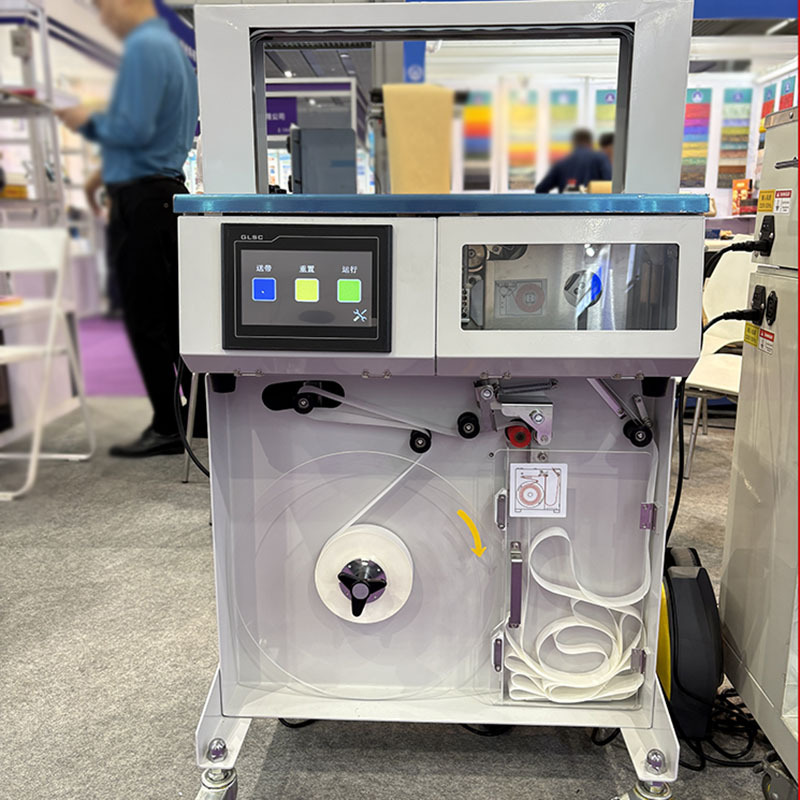
| Band supply | Confirm the actual reel format and loading procedure rather than assuming all compact machines use the same roll. | A cabinet photo does not establish reel capacity. Ask for the quoted core, outside diameter and band specification. |
| Moving the station | Check equipment weight and the approved handling method; a carrying handle is not an installation plan. | If mobility is required, specify it in the order and confirm how the machine is secured during operation. |
| Product handling | Define loading, alignment, triggering and removal. | Define the same steps. A taller machine does not by itself automate product transport. |
Use a confirmed specification as a starting point
The KPW-SDJ150 paper and OPP banding machine currently lists a maximum bundle section of 470 × 205 mm (width × height), a minimum section of 30 × 10 mm and machine dimensions of 642 × 354 × 476 mm (length × width × height). The listed band-width choices are 20 or 30 mm.
These values describe the KPW-SDJ150 listing, not every machine pictured in this article or every banding product. Confirm the pack orientation, operating clearance, selected band width and reel format on the quotation. Do not assume that the two band widths interchange without setup changes or parts.
For another pictured configuration, use the OPP banding equipment enquiry and identify the image you mean. Request its own model and specification sheet instead of applying the KPW-SDJ150 dimensions to it.
Separate an automatic cycle from an automated line
Write down who or what performs each step: supply the product, align the bundle, start the cycle, reposition for another band and remove the finished pack. If you want an upstream or downstream conveyor, specify the transfer height, direction, product spacing and responsibility for integration.
Ask the supplier to mark which items are included, optional or supplied by you. Product detection, a printer, positioning aids, a conveyor and a cabinet are separate items to clarify; none is established by the word “automatic” alone.
Industry catalogues also distinguish standalone equipment from line integration; see ATS-Tanner's banding equipment overview. Its specifications belong to its own machines and are not Keepway performance ratings.
Compare a complete job, including changeovers
Provide representative bundles and agree the number and position of bands. Record accepted finished bundles over a defined trial, including normal loading, turning and removal. Review a change from the smallest to the largest pack and a roll replacement so the comparison reflects the work you expect the station to do.
- State available operator time and the required output for the job.
- Identify where unbanded and finished products will accumulate.
- Record setup changes, consumable changes and rejected bundles separately.
- Agree the band position, joint appearance and handling acceptance before the trial.
ESD-sensitive electronics, direct food contact or a controlled production environment require a separate specification and supporting documentation. A product photo or material name is not proof of suitability for those conditions. For an existing machine with a problem, use the banding support checklist.
Keepway service
Two-year warranty, with replacement parts and shipping of those parts supplied free of charge during the warranty period. Lifetime after-sales service and technical support are available.
Send a workstation brief for a matched quotation
Include bundle photographs and dimensions, your station sketch, available bench or floor space, band specification, bands per bundle, target output and destination power supply. Mark the steps that should remain manual and the steps you want included in the equipment scope.
Request KPW-SDJ150 selectionDiscuss another banding setup